

Description
8x8 Video Meetings: Seamless Web Conferencing
Overview
8x8 Video Meetings is a standalone video conferencing solution designed for entrepreneurs, small and medium-sized businesses (SMBs), and large enterprise departments. Built by 8x8, the software enables real-time collaboration with colleagues, vendors, and customers through secure, high-quality meetings. It addresses the growing need for flexible, accessible, and reliable communication tools in distributed work environments. The platform supports instant video conferences and integrates directly with Google Calendar, allowing users to schedule and join meetings without switching between applications. Its browser-based architecture eliminates the need for downloads, making it accessible to anyone with a web link. The service is ideal for teams that prioritize ease of use, privacy, and scalability. Users can join meetings from any device with a modern browser, ensuring broad compatibility across platforms. The software is particularly suited for remote teams, hybrid work models, and organizations seeking a lightweight alternative to heavier enterprise solutions. While the developer did not provide additional details on internal architecture or team background, the product’s foundation in open-source technology suggests community-driven development and transparency.
Key Features & Capabilities
- Browser-Based Access: Join meetings directly through any modern web browser without installing software. This reduces friction for participants and supports quick onboarding.
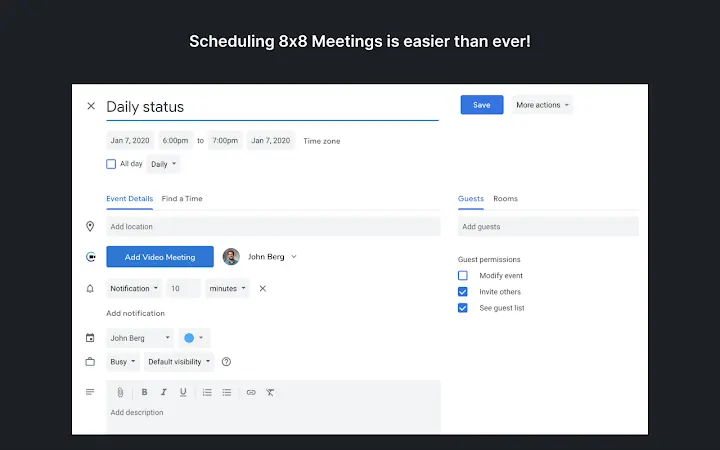
- Google Calendar Integration: Schedule and join meetings seamlessly from your Google Calendar, streamlining workflow and reducing scheduling errors.
- Anonymous Meeting Participation: Attend meetings without creating an account, ideal for external collaborators or one-time participants.
- Password Protection: Secure meeting rooms with custom passwords to control access and prevent unauthorized entry.
- End-to-End Encryption: All meetings are encrypted by default, ensuring data privacy and compliance with security standards.
- High-Quality Audio and Video: Utilizes the Opus codec for audio and VP8 for video, delivering clear, stable streams even on moderate connections.
- Pretty URLs for Meetings: Create memorable meeting links such as
https://8x8.vc/YourTeam/YourName, replacing complex random room IDs. - Open-Source Foundation: Built on the Jitsi open-source projects, promoting transparency, community contributions, and long-term sustainability.
These features collectively support efficient, secure, and inclusive collaboration. For example, a marketing team can schedule a client review via Google Calendar, generate a branded URL, and share it with a vendor who joins anonymously without signing up. A department head can lock a board meeting with a password to maintain confidentiality. The use of open-source components also allows for auditability and trust in the software’s integrity.
User Interface, Workflow & Performance
The user interface of 8x8 Video Meetings is minimal and intuitive, designed around simplicity and accessibility. Navigation is streamlined through a clean dashboard that displays active meetings, upcoming events, and quick access to new sessions. The workflow is efficient: users can create a new meeting with a single click, receive a shareable link, and invite participants instantly. The interface adapts to various screen sizes, ensuring usability across desktop devices. Meeting controls are clearly labeled and accessible during sessions, including mute, camera toggle, screen sharing, and participant management. The developer did not specify resource usage details, but based on general software behavior patterns, the application likely maintains low CPU and RAM consumption due to its browser-based nature and reliance on WebRTC. Performance is expected to be stable under typical conditions, with minimal latency during video transmission. No reports of crashes or instability were mentioned. The lack of a dedicated desktop app may affect some users who prefer native integrations, but the browser-first approach enhances cross-platform consistency and reduces maintenance overhead.
Compatibility & System Requirements
8x8 Video Meetings is compatible with Windows, Mac, and Linux operating systems, ensuring broad accessibility across desktop environments. The installation size is 50 MB, which is relatively compact for a full-featured video conferencing tool. The software operates primarily through web browsers, meaning that the host system must support modern web standards such as WebRTC, HTML5, and JavaScript. Exact system requirements were not listed, but compatibility is likely dependent on having a recent version of a supported browser (e.g., Chrome, Firefox, Edge, Safari). No additional hardware specifications were provided. The developer did not specify minimum processor, RAM, or GPU requirements. Users are advised to ensure their system meets general browser performance benchmarks for video streaming. Platform compatibility information is limited to the operating systems listed, with no mention of mobile or tablet support. The software does not require installation on every device, as participants can join via browser without downloading any software.
Pros and Cons
Pros
- Free to use with no hidden costs
- Browser-based access eliminates installation barriers
- Seamless integration with Google Calendar
- Anonymous meeting participation for external users
- End-to-end encryption ensures secure communication
- Customizable, easy-to-remember meeting URLs
- Open-source foundation promotes transparency and trust
- High-quality audio and video via modern codecs
Cons
- No dedicated desktop application for enhanced features
- Exact system requirements were not specified
- Platform compatibility information is limited
- Limited customization options for branding or layout
- Dependence on third-party browsers for full functionality
FAQ Section
Is 8x8 Video Meetings free to use?
Yes, the software is available at no cost. There are no subscription fees or premium tiers required to access core features.
Can I use 8x8 Video Meetings without creating an account?
Yes, users can join meetings anonymously without registering. This feature is ideal for external participants who do not need a permanent account.
Does 8x8 Video Meetings support Google Calendar?
Yes, the software integrates directly with Google Calendar, allowing users to schedule and join meetings from their calendar interface.
Is my data secure during meetings?
Yes, all meetings are encrypted by default. The service uses end-to-end encryption to protect audio, video, and shared content.
Do I need to download software to join a meeting?
No, participants can join meetings directly through any modern web browser. No downloads are required for attendees.
Final Thoughts + CTA
8x8 Video Meetings delivers a reliable, secure, and user-friendly experience for teams seeking a lightweight yet powerful video conferencing solution. Its browser-first design, Google Calendar integration, and support for anonymous participation make it ideal for SMBs and remote teams. The open-source foundation adds credibility, while end-to-end encryption ensures privacy. Although the lack of a dedicated desktop app may limit advanced functionality for power users, the core experience remains strong and accessible. For professionals who value simplicity, security, and cross-platform compatibility, 8x8 Video Meetings stands out as a compelling choice. The combination of free access, high-quality communication, and seamless workflow integration offers clear advantages. Download 8x8 Video Meetings now to experience secure, instant video collaboration with your team and clients.
Guides & Tutorials for 8x8 Meet Extension for Chrome
How to install 8x8 Meet Extension for Chrome
- Click the Preview / Download button above.
- Once redirected, accept the terms and click Install.
- Wait for the 8x8 Meet Extension for Chrome download to finish on your device.
How to use 8x8 Meet Extension for Chrome
This software is primarily used for its core features described above. Open the app after installation to explore its capabilities.
User Reviews for 8x8 Meet Extension for Chrome 0
No reviews found





